
Introduction
I used to avoid any model outside OpenAI and Anthropic. But the free GLM-5.2 that Devin offered completely changed my impression of Chinese open-weight models.
GLM-5.2 finds problems fast, which makes it great for quickly producing scripts and small tools, and for rapid trial-and-error in real environments (for example, having it verify low-level webOS commands to quickly produce a skill). The craziest part: during the promo period, none of the usage counted against my quota. Insane value for money.
Probably because I used it more, I paid more attention. Around July and August, posts about Chinese models kept showing up on my X feed. The names DeepSeek V4 Flash, V4.1 Flash, and GLM-5.3 Flash came up constantly. The claims were all the same: benchmark scores in the top tier, fast, cheap per token, and image input support.
One post hyped DeepSeek V4 Flash 0731 to the skies, complete with the trendy term “kill zone,” and charts designed to make you “slump in your chair gasping.” It looked pretty convincing.

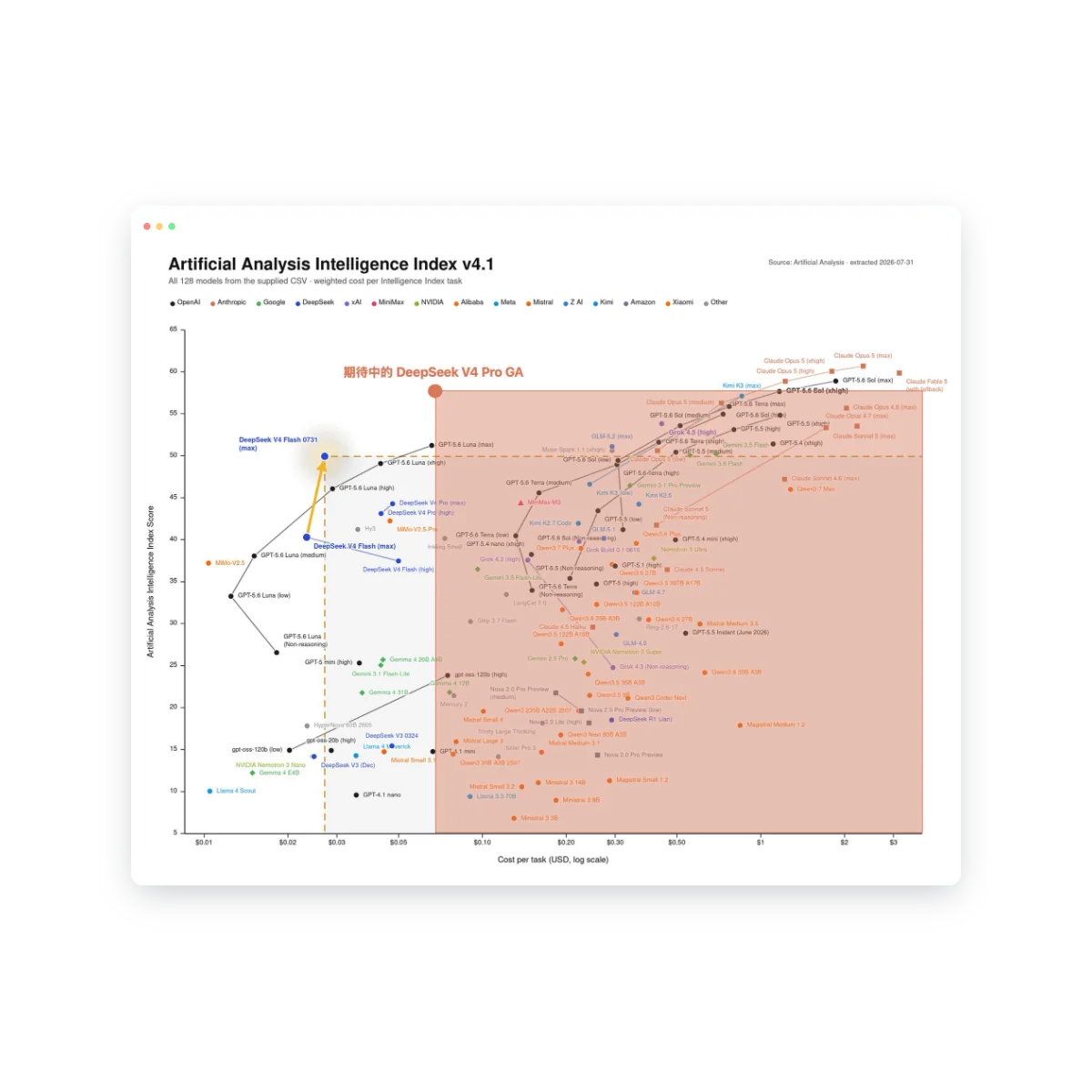
By late August, V4-Flash-Vision-Exp launched, advertised as able to see images, call tools, and run agents — multimodal agent performance approaching Opus-4.8. When V4.1 Flash came out, people claimed it could take its own screenshots, read them, and fix UI, an experience “genuinely at the level of 5.6 Sol xhigh.”


Speed was the most repeated claim. Someone said Flash could score 70 in 3 minutes of work, and three iterations might get it to 95 — while a premium model grinding away for 15 minutes might only reach 90. Others said that in the time Astra spent a dozen-plus minutes producing an 80% solution, V4.1 Flash could already go back and forth for several rounds and reach 90%.


The speed claims I believed — GLM-5.2 is genuinely fast; often Opus is still reading the code while GLM-5.2 has already returned review comments. No reason successor models would be slower. Plus, image reading was actually useful to me: for frontend UI issues, describing the problem or pasting error logs is clunkier than letting a model just look at the screen. So once OpenCode and Devin offered these new models, I switched my default. The end result, however, was a huge disappointment…
What Went Wrong
First, image reading.
I was using Pi Coding Agent with deepseek-v4-flash-vision-exp, debugging a webOS app UI issue, and had the model take TV screenshots itself.
By the fifth screenshot, the API returned a 400:
1At most 4 image(s) may be provided in one promptI didn’t get it at first — I only sent one image at a time, so why the error? Upgrading Pi didn’t help. Running the same test with Opus revealed it: every agent request carries the entire message history, previously attached images included. Once the cumulative count exceeds 4, the request is rejected. It’s refused at the model API level — every subsequent request returned stopReason=error. The session was effectively bricked.
That’s a hard cap on image input. If the API can only take 4 images, bragging about image-reading ability is just false advertising.
I ended up limiting the image budget in AGENTS.md, which meant every other perfectly fine model had to obey the same cap.
Second, these models often ran for a very long time. Small issues, small requests — half an hour per fix.
Eventually they’d hit the reasoning limit set by the harness and get killed by Pi or Devin outright. Expanding the thinking showed massive amounts of deliberation — obsessing over details. Both Flash models exhibited this most clearly. They think fast, and they think a lot — but solving the same problem always took several times longer.
Does “Don’t Overthink” Work?
At first I doubted myself. Was my prompt badly written — did I forget to ask for conciseness? Was the task too big, leaving it circling in complex logic?
Breaking a request down and giving a simple task did help — it would think a bit longer without hitting the limit. But after a few more rounds, once the task reached its middle stretch, it hit the limit again — and once that happens, the session is dead and basically can’t continue.
What about stating it directly in the prompt? For example:
- “Keep your thinking depth within limits”
- “Don’t overthink”
Completely useless. It kept thinking all the way until the harness limit kicked it out. So this is not something a prompt can fix.
Why do LLMs overthink? I asked GPT to look around the web for anyone who had hit or tried to solve the same problem.
Turns Out Overthinking Is Already a Research Topic
I looked into it, and it’s not just your anecdotal impression. Overthinking is already a dedicated problem in LLM reasoning research.
Here, overthinking doesn’t mean answers that are too long or too wordy. It means the model already has enough information, has found a workable solution, even arrived at the correct answer — and keeps spending reasoning compute anyway. What researchers care about: where the model spends its reasoning budget, and why it didn’t stop in time.
Google DeepMind’s TRACE analyzes exactly this. Rather than just counting total reasoning tokens, it splits the reasoning process into sub-thoughts and observes why the model chooses to continue at each step. Two trajectories are typical:
-
Explorer (over-exploration)
A workable solution already exists, yet the model keeps looking for other routes:
1already have a workable solution
2→ is there another possibility?
3→ verify option two
4→ discover a third possibility
5→ keep exploring
The search space is sufficient, but the model keeps expanding it. It mistakes “I can keep thinking” for “it’s worth thinking more.”
-
Late Landing (refuses to land)
The model gets close to — or even reaches — the correct answer early, but keeps re-verifying instead of finishing:
1got the answer
2→ double-check
3→ check an edge case
4→ doubt an earlier assumption
5→ re-verify
6→ double-check again
This is over-verification: the answer arrives early; the stop arrives late.
Another line of research looks at the marginal utility of reasoning. Adding reasoning tokens doesn’t guarantee accuracy rises in step — it can bring positive returns first, then approach zero, then turn negative:
1marginal utility of extra reasoning
2positive → near zero → negative
Sometimes a model that already answered correctly starts doubting the right answer after more reasoning and ends up changing it to a wrong one. Call it negative marginal reasoning utility.
So three things need to be distinguished:
1the ability to solve the problem
2≠ the ability to judge how much reasoning to invest
3≠ the ability to stop once it's enough
A model can be very smart yet bad at allocating reasoning and bad at stopping. Benchmarks usually care about whether the final answer is right; an agent harness also cares about how many tokens it used, how much time it took, how many tools it called, and whether it can finish within budget.
As for why “don’t overthink” doesn’t necessarily work: natural-language instructions can only shift the model’s tendency to continue or stop — they are not a deterministic resource controller:
1Prompt: "don't overthink"
2    ↓
3shifts the continue / stop probabilities
4    ↓
5let me double-check → another possibility → one more check → …
6    ↓
7harness hard limit
8    ↓
9forced stop
A prompt is a soft constraint; reasoning_tokens >= limit → terminate is the hard constraint. The model understanding “think less” doesn’t mean it thereby gains a reliable stopping mechanism.
Reading this, my first reaction was: Late Landing. The two Flash models often weren’t short of ideas — they confirmed, overturned, and re-confirmed all the way down until they hit the harness limit. On the surface it looks exactly like a model that met the conditions to land yet never made the decision to stop.
This also explains why those two prompt lines did nothing. “Don’t overthink” may indeed influence reasoning length, but being able to influence is not the same as being able to guarantee. If when to stop is a learned behavior inside the model, a few sentences of natural language are unlikely to turn it into a strict resource cap.
The name “Flash” is also misleading. It mostly describes inference latency, throughput, and price — it doesn’t promise a short reasoning trajectory. Generating fast per second and generating a lot in total can absolutely be true at once: it’s not thinking slowly — it’s thinking too much, quickly.
So I had a hypothesis: the problem may lie in the model’s judgment of “how much reasoning this task deserves, and when to stop.” Both Flash models showing similar behavior made me suspect they’ve learned to explore and self-correct more aggressively — without learning proportionally when to wrap up.
But that’s still just a hypothesis. How much does it actually think? Where does it fail to stop? How far is it from GLM-5.2? These agents store session logs locally — how do I quantify the traces they leave behind?
Quantifying the Overthinking Trail
Session Logs
Pi and Devin both store sessions locally. I had GLM-5.2 write a few scripts to extract reasoning content from the logs and group the stats by model.
First, which logs are readable:
| Source | Log path | Format & fields | Reasoning readable? |
|---|---|---|---|
| Pi | ~/.pi/agent/sessions/**/*.jsonl |
JSONL, content[].type === "thinking" |
Yes |
| Devin | ~/.local/share/devin/cli/transcripts/*.json |
JSON, steps[].reasoning_content |
Yes (written after the session ends) |
| Copilot | ~/.copilot/session-state/*/events.jsonl |
JSONL, data.reasoningText |
Yes |
| Codex | ~/.codex/sessions/**/*.jsonl |
JSONL | No (encrypted) |
| Grok | ~/.grok/sessions/**/chat_history.jsonl |
JSONL | No (fields are empty) |
Codex and Grok were excluded.
Only sessions with thinking blocks were counted.
Grouping by my own usage impressions, excluding models with too few samples:
| Group | Model | Sessions |
|---|---|---|
| ✅ Normal (153) | GLM-5.2 High | 68 |
| GPT-5.6 Sol | 56 | |
| GPT-5.6 Luna | 29 | |
| ❓ Problem (85) | DeepSeek V4 Flash | 40 |
| GLM-5.3 Flash | 33 | |
| DeepSeek V4.1 Flash | 12 | |
| 🗑️ Too few samples (9) | Gemini 3.8 Flash | 3 |
| GPT-5.6 Terra | 2 | |
| Claude Opus 5 | 1 | |
| Qwen 3.7 Max | 1 | |
| ox-alpha-free | 1 | |
| GPT-5.4 | 1 |
Thinking Block Character Counts
At the same high effort, first: how much does each model think on average?
| Model | Sessions | Avg. max block (chars) | Avg. total thinking chars | Avg. block count |
|---|---|---|---|---|
| GPT-5.6 Sol | 56 | 513 | 4,418 | 25.0 |
| GPT-5.6 Luna | 29 | 1,362 | 11,440 | 79.6 |
| GLM-5.2 High | 68 | 7,117 | 35,510 | 26.4 |
| DeepSeek V4 Flash | 40 | 14,844 | 167,479 | 70.0 |
| GLM-5.3 Flash | 33 | 18,927 | 123,280 | 56.6 |
| DeepSeek V4.1 Flash | 12 | 29,795 | 221,134 | 67.1 |
GPT-5.6 Luna averages 1,362 chars for its largest block; DeepSeek V4.1 Flash averages 29,795 — a 22× difference.
GLM-5.2 sits in the middle — more than GPT-5.6, a step below Flash.
Over-Limit Rate
I set a line for “over-limit.” A session counts if it meets any of these:
- one thinking block over 12,000 chars
- 80+ cumulative thinking blocks
- 100,000+ cumulative thinking chars
| Model | Sessions | Over-limit | Rate |
|---|---|---|---|
| GPT-5.6 Sol | 56 | 2 | 4% |
| GPT-5.6 Luna | 29 | 3 | 10% |
| GLM-5.2 High | 68 | 11 | 16% |
| GLM-5.3 Flash | 33 | 20 | 61% |
| DeepSeek V4 Flash | 40 | 25 | 62% |
| DeepSeek V4.1 Flash | 12 | 10 | 83% |
The normal group sits at 4%–16%, the three Flash models at 61%–83%, with nothing in between. Within the same family, GLM goes from 16% at 5.2 to 61% at 5.3 Flash — nearly 4×.
That matches how it felt to use. But the over-limit rate only shows it thinks a lot — how exactly does it think too much?
Limitations of the Data
- In Devin, DeepSeek V4 / V4.1 Flash can only be set to high at minimum — low and medium can’t be tested.
- These are all real usage sessions; task difficulty differs per model. Cumulative thresholds can false-positive on long, healthy sessions.
Two Typical Overthinking Patterns
We can summarize overthinking into two patterns:
1Pattern 1: vertical deep-dive (a single 10k–80k-char block of repeated reasoning and self-refutation)
2Pattern 2: horizontal sprawl (each block looks normal, but nearly every tool call is preceded by one, and the total piles up)
1. Vertical Deep-Dive (a single block ballooning)
The model falls into tens of thousands of characters of monologue inside one thinking block — proposing hypotheses, overturning them, re-arguing boundary conditions.
Typical signs:
- A normal model’s single block usually lands in the hundreds of chars, mostly to sort out the preconditions for a tool call.
- A problem model casually emits 20,000–70,000 chars in one block, deriving a simple function rename like a moon-landing project.
Real case (GLM-5.3 Flash):
I asked it to look into two issues: the progress bar jitters during fast-forward, and the fast-forward speed multiplier not taking effect. It couldn’t figure out how to simulate a long-press via adb, so I sent three messages within 3 minutes:
112:46:57  You still haven't figured out long-press — go read how DS4.1 did it earlier
212:48:26  Just read the session history; there's a pi session on the same topic
312:49:54  The session starts with "check two issues: 1. the fast-forward progress bar jitters on the playback screen…"
“DS4.1” referred to an earlier session on the same topic that ran DeepSeek V4.1 Flash. It went and dug through that session, then wrote the largest thinking block of the whole session: 59,740 chars. Within that block, it successively guessed “DS4.1” might be:
- A DualShock 4 controller, where
.1might be a firmware version - design spec 4.1
- rule 4.1 in AGENTS.md
- a typo for
0.5.1orPS4.1
Midway, it considered just asking me:
Actually, let me just ask… no wait
By the end of the block, it was still researching the controller:
OR!!! Wait. DS4 as gamepad: D-pad on gamepads is often an AXIS (HAT_X/HAT_Y), not keys! …… OK, enough.
That session had 44 thinking blocks totaling 247,665 chars. In the end I tested it myself, found rewind had turned into fast-forward, and had to have it revert that part — keeping only the digit-jitter fix.
2. Horizontal Sprawl (thinking at every step, totals exploding)
This pattern is subtler. Each block is only a few hundred to two or three thousand chars — looks “restrained.” But it writes one before nearly every tool call, and once the block count climbs, the cumulative thinking is staggering.
Real case (DS V4.1 Flash):
In the same session, I made two requests:
| Request | thinking blocks | total chars | avg per block | max block | tool calls | duration |
|---|---|---|---|---|---|---|
| Add a setting to clear recent-play history | 44 | 42,984 | 977 | 8,415 | 85 | ~6 min |
| Reorganize the settings page from two columns to one | 39 | 71,666 | 1,837 | 9,430 | 63 | ~13 min |
The two requests totaled 83 blocks, 114,650 chars, and 148 tool calls — not a single block hit the 12,000-char critical threshold, so looking only at individual blocks you’d never catch it. The second request was just changing a two-column layout to one column, yet its total thinking was longer than that single 59,740-char block above.
Opening the blocks, most were deliberating very small things:
- 2,701 chars: agonizing over whether to show “N recent plays” next to the clear button, whether to use plurals resources — and RTL, while at it
- 1,363 chars: listing one by one which imports could be removed after going single-column
- 786 chars: searched
rememberwith\bremember\b, got 3 hits, then reasoned about which 3 they were - 648 chars: nobody in the repo had used
HorizontalDivider; unsure whether the current version has it, decided to use a 1dpBoxas the divider instead - 214 chars:
Oops! I accidentally replaced the material icons imports...— fixing an import it broke in the previous step
Each passage is defensible on its own. The problem is it writes one at every step.
Same high Effort, Different Meanings
With overthinking, the most direct idea is lowering reasoning effort. But lining up the four vendors’ official docs, I found high doesn’t mean the same thing at all:
| Available levels | Default | How the docs describe it | |
|---|---|---|---|
| OpenAI | none minimal low medium high xhigh max, depending on the model |
medium |
high for hard reasoning, complex debugging, deep planning; the model self-adapts within each level, using fewer tokens on simple tasks |
| Claude | low medium high xhigh max |
high for most models |
high spends whatever tokens the task needs; effort is a behavioral signal, not a strict token budget |
| DeepSeek | effectively only low high max |
high |
requesting medium maps to high; requesting xhigh also maps to high |
| GLM | low high max |
max |
low light reasoning, high enhanced reasoning, max deep reasoning |
Two things are visible straight from the docs:
- The scales differ. OpenAI has 7 levels with
highsitting above center; DeepSeek and GLM have 3, wherehighis the middle. The samehighin the harness dropdown maps to different scales underneath. - Only OpenAI and Claude write “scale with task difficulty” into the definition. DeepSeek and GLM’s docs only describe depth (light, enhanced, deep) — I saw nothing similar.
Here’s my guess:
Since effort isn’t a hard budget, how much high actually thinks can only be trained behavior: during training the model learns a rough length distribution per level. Judging by the wording, OpenAI and Claude at least treat “within the same level, think less on easy tasks and more on hard ones” as a training objective. Flash models may have learned only the single dimension “higher level → deeper thinking,” insensitive to task difficulty — so a tiny problem still gets the deep-reasoning length. That’s the vertical deep-dive. And it lines up with the earlier hypothesis: the problem is in judging “how much reasoning this task deserves.”
Horizontal sprawl may relate to interleaved thinking. GLM’s docs state interleaved thinking is on by default — the model thinks between tool calls. If the model never learned “this step is trivial, no need to think,” it pays a fixed “thinking tax” before each tool call. In the case above, nearly every tool call had a thinking block in front of it — exactly that shape.
Add Flash’s positioning: it was meant to be a lightweight model for running lots of calls fast and cheap — and now it’s been placed at the deep-reasoning end of the scale.
Can Something Warn Me When Overthinking Happens?
If the problem is in the model itself, there are only two root fixes: switch models, or lower reasoning effort.
The catch: often you can’t lower it:
- In Devin, DeepSeek V4 / V4.1 Flash only go as low as high
- GLM-5.3 officially removed
thinking.type: "disabled"; thinking is always on, with low as the minimum. The default isreasoning_effort: "max". In the official benchmark, the max level averages ~75K output tokens per task - In DeepSeek’s thinking mode,
temperature,presence_penalty, andfrequency_penaltyall stop working - OpenCode also has an issue asking for a button to disable DeepSeek V4 thinking
By the time I notice something’s off, it has usually already hit the harness limit and the session is dead. What I wanted was: before it hits the cap, something that tells me this session is no longer normal.
First I looked for existing plugins in the Pi community:
| Plugin | What it detects | Why it misses overthinking |
|---|---|---|
pi-loop-police |
consecutive repetition in thinking blocks (≥80 chars) | catches stuck loops. Also MAX_WINDOW is only 4,000 — blocks longer than 4,000 chars aren’t inspected at all |
pi-deadloop |
Jaccard similarity ≥85% across 4 consecutive replies | also loop detection |
pi-behavior-monitors |
uses another LLM to classify behavior | not rule-based; every judgment costs another model call |
pi-thinking-tail |
collapses long thinking blocks for display | display only — no detection, no warning |
They all assume a problem means repetition. But Flash’s overthinking doesn’t repeat — every block is new content, just too long and too many.
Given the distributions above, the normal and problem groups are far apart — metrics should be able to tell whether overthinking is happening.
Next Action: A Warning Plugin, pi-overthink-warning
The goal is straightforward: not to solve overthinking for the model, just to judge whether the current session has clearly departed from the historical normal distribution — then warn me.
Per-Block Thresholds
- Normal-model sessions average a max block of 3,936 chars; problem models 19,045 — a 4.8× gap
- For normal models’ thinking blocks, p95 is 2,608 chars and p99 is 6,672
The thresholds sit at those positions:
| Level | Threshold | Meaning |
|---|---|---|
| warn | 5,000 chars | above normal-model p95 (2,608) |
| alert | 8,000 chars | above normal-model p99 (6,672) |
| critical | 12,000 chars | confirmed overthinking |
At 5,000 chars, only 1.56% of normal blocks trigger — about 1 in 64. At 12,000, it’s 0.37%; false positives are very, very unlikely.
Cumulative Thresholds
For the second pattern:
- Normal models average 25–35 blocks per session, 5k–35k chars
- Problem models average 58–88 blocks per session, 129k–281k chars
| Level | Blocks | Total chars |
|---|---|---|
| warn | 50+ | or 50,000+ |
| alert | 80+ | or 100,000+ |
50 blocks / 50k chars is the upper bound of normal models; 80 blocks / 100k chars is already inside problem-model territory. Either metric hitting the line triggers a warning. Long healthy sessions can also accumulate to this, so the cumulative side only has warn and alert — no critical.
As a Plugin
A few principles:
- Warn only, never interfere. No prompts injected into the conversation, no reasoning modified, no interrupting the model.
- Non-blocking. No popups. warn is a yellow notification, alert is a yellow notification, critical is a red one.
- Escalate only, never de-escalate. Record the highest level per session rather than popping on every tool call.
- The message suggests “Switch model” first, then “lower reasoning effort if available.” Switching comes first because many models simply can’t be lowered.
For example, when a single block hits critical, the notice looks like this:
1Thinking block {n} chars. Over 12000 confirmed overthinking.
2Switch model now or lower reasoning effort if available.
Devin can’t warn in real time yet. Devin’s hooks only cover PreToolUse, PostToolUse, UserPromptSubmit, Stop, SessionStart, SessionEnd, and PostCompaction — nothing reasoning-related. Reasoning content is only written to the transcript when the session ends, so there’s nothing to read mid-run.
Installation and Reproduction
The repo is here: https://github.com/CheerChen/pi-overthink-warning
Install:
1pi install https://github.com/CheerChen/pi-overthink-warningThe analysis scripts live in the same repo:
 1git clone https://github.com/cheerchen/pi-overthink-warning
 2cd pi-overthink-warning
 3
 4# scan all sessions in bulk, grouped by model
 5uv run scripts/batch_scan.py
 6
 7# merge models, compute the over-limit rate
 8uv run scripts/incident_rate.py
 9
10# feature extraction for a single session
11uv run scripts/analyze_overthinking.py "label" /path/to/session.jsonl
Plugin Limitations
- Repeating: this plugin only warns — it does not stop the model from overthinking.
- Task difficulty differs per model. Healthy sessions can trigger false positives.
Wrapping Up
I came out of this with some new understanding of Flash models — but it cost real time and effort.
The whole ordeal left me exhausted. Not exhausted from quantifying the results, but from knowing how many real tasks suffered because of the models’ overthinking flaw. Clearly Chinese open-weight models still have a long road ahead. If all you pursue is fast and cheap with no quality, what’s the practical point?
And as for those engagement-farming accounts that only know how to hype — while they’re busy chasing impressions, could they maybe get hands-on and actually use the thing before posting? It’s always straight to “slumped in shock,” “massive bombshell,” “kill zone” — irresponsible vocabulary that, amplified by platform algorithms feeding drive-by audiences who never look back, turns digital-age discourse into endless rounds of “combining like terms”: an absurd exercise in pure eyeball-chasing.
References
- Do LLMs Really Need 10+ Thoughts for “Find the Time 1000 Days Later”? Towards Structural Understanding of LLM Overthinking
- Do NOT Think That Much for 2+3=? On the Overthinking of o1-Like LLMs
- Inverse Scaling in Test-Time Compute
- Thinking Mode | DeepSeek API Docs
- GLM-5.3 - Z.AI Developer Document
- [FEATURE]:Deepseek-V4 need a “disable thinking” button · anomalyco/opencode#24610
 Hi, I’m CheerChen.